
–

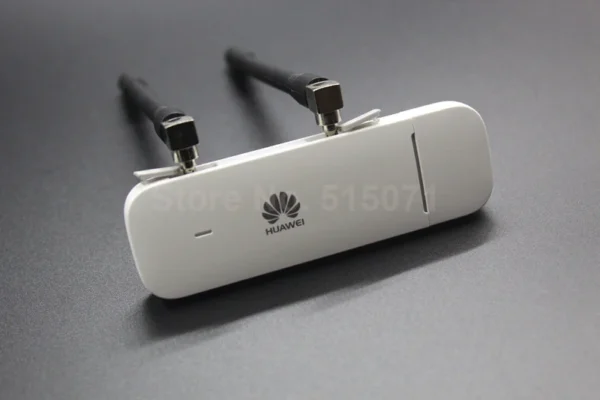

1. The first rule to Chosen MODEM : LTE BANDS matter more than the model number
A modem can “work” but still be a bad choice if it lacks the main bands used in your area. Always check LTE bands BEFORE buying.
- EUROPE – common “must have” LTE bands:
– B20 (800 MHz) = long range / rural coverage
– B3 (1800 MHz) + B7 (2600 MHz) = urban speed/capacity
– Often also B1 (2100) and B8 (900)
– B28 (700) is becoming more common in many countries
— Recommended EU band set:
– B1 / B3 / B7 / B8 / B20 (and ideally B28)
- AMERICA (North America – USA/Canada) – common “must have” LTE bands:
– B2 (1900 MHz) + B4/B66 (AWS) = main “workhorse” capacity bands
– B12/B17 (700 MHz) = wide coverage (many areas)
– B13 (700 MHz) = very important for Verizon coverage
– B5 (850 MHz) = coverage band used by many carriers
– B71 (600 MHz) = very important for T-Mobile extended coverage
— Recommended USA band set:
– B2 / B4 / B5 / B12 / B13 / B66 (and ideally B71; sometimes also B25/B26/B41 depending on carrier)
- ASIA (very country-dependent) – common “must have” LTE bands:
– B1 (2100) + B3 (1800) = very common baseline bands
– B5 (850) / B8 (900) = coverage bands in many countries
– B7 (2600) = capacity band in many cities
– B28 (700) = increasingly common in many APAC countries
– TDD bands are often crucial in Asia:
– B40 (2300) and B41 (2500) are widely used in many markets (e.g., parts of South Asia/India)
– Sometimes also B38 (2600 TDD) in some regions
— Recommended “Asia-friendly” band set:
– B1 / B3 / B5 / B7 / B8 / B28 + (TDD: B40 and/or B41; sometimes B38)
2. Recommended HUAWEI E3372 variants by region (based on bands)
- A) EUROPE – “safe choices”
– E3372s-153 (EU):
LTE: B1 / B3 / B7 / B8 / B20
– E3372h-153 (EU):
LTE: B1 / B3 / B7 / B8 / B20
– E3372h-210 (EU + some TDD):
LTE FDD: B1 / B3 / B7 / B8 / B20
LTE TDD: B38
– E3372h-320 (EU + B28): >> VERY GOOD OPTIONS FOR Europe
LTE: B1 / B3 / B7 / B8 / B20 / B28
(Very strong “default” choice for Europe because it includes B28.)
– E3372-325 / “Brovi” (EU + extra TDD options): >> VERY GOOD OPTIONS FOR Europe
LTE FDD: B1 / B3 / B7 / B8 / B20 / B28
LTE TDD: B38 / B40
– E3372h-607 → LTE B1/B3/B7/B8/B28 + TDD B40
- B) AMERICA (especially North America) – be careful
– E3372h-510:
LTE: B1 / B2 / B4 / B5 / B7 / B28
— NOTE:
– Many US/Canada carriers rely on bands like B12/B13/B17/B66/B71 etc.
If your carrier depends on those, an E3372 may have weak coverage.
Always confirm your carrier’s LTE bands first.
- C) ASIA / Middle East / Africa – country dependent
– If you need TDD band B40 (common in parts of Asia/India), look for:
– E3372h-607:
LTE FDD: B1 / B3 / B7 / B8 / B28
LTE TDD: B40
– E3372-325:
includes TDD B40 (and B38)
– E3372h-210 → LTE B1/B3/B7/B8/B20 + TDD B38
– E3372h-608 → LTE FDD B1/B3/B7/B8/B28 + TDD B40
- Many other modems are also compatible, for example:
-4G (LTE) Cat 4 examples over USB (they show up as a network adapter: RNDIS/ECM/MBIM/QMI):
-Quectel EG25-G (LTE Cat 4) – found in many USB dongles/kits; supports modes like RNDIS/MBIM/ECM/NCM (so it appears as a network interface).
-Quectel EC25 (LTE Cat 4) – very widely used as a module (LGA / miniPCIe) in dongles/routers; on Linux it is usually used with QMI/MBIM/ECM (network interface).
-SIMCom SIM7600 (LTE Cat 4) – many USB boards/dongles based on SIM7600 expose RNDIS (internet as a network adapter).
-Uas4g5gLte doesn’t necessarily depend on a modem, because what matters is that it has internet access—the source of that internet isn’t important. It can also be provided via Ethernet on Raspberry and Radxa boards that have -Ethernet ports, which can be used to get internet from other devices: routers, modems that expose LAN ports (where a client can connect), or internet coming from Starlink modules.
-You can also use a Wi-Fi connection to connect to an access point that provides internet.
So the conclusion is that you’re not tied to a USB modem—you can choose from a much wider range of connections to provide internet to the companion computer.
– For other modem types you would like to use, please contact me and I will add support for them on request. In general, a wide range of modems are already supported—especially those that behave like a network adapter over USB, similar to Huawei HiLink mode (the modem appears as a USB Ethernet device, making it easy and stable to use). Support can be added for almost any modem on the market, but for that please contact me privately so we can confirm the exact model, chipset, and connection mode.
– First, test your modem in the Uas4g5gLte program:
– Open the Modem tab and try it as Stick mode and as HiLink mode. + – If it is not supported in either mode, contact me and I’ll help you get it working.

